Free tools / ai-crawler-checker
Free tool · runs on our server
AI Crawler Checker
Whether you are accidentally blocking AI from reading your site. Twelve AI visitors, one verdict each, with the exact line in your own rules file that decided it.
free · no card
Check your site
live check: onThis check runs on our server, and it has to: a browser cannot read a file from another website. we fetch your rules file and your homepage from our own connection · we store no scan against your site without you asking us to
This check reads your real robots.txt.
Enter your domain and it reads your real robots.txt from our server. A row the check cannot resolve is never shown as a green tick — it is shown as not measured, with the reason.
Until you run it, the example underneath is made-up data on example.com, labelled as such.
Who is allowed to read your site
not measured| AI visitor | Run by | Verdict | The line that decided it |
|---|
not measured is not the same as allowed, and it is never a zero — a failed fetch, a timeout, or an answer that never came back is a check that did not run.
What a finished result looks like
example.com EXAMPLE DATA12
AI visitors read
one verdict each
7
Allowed
a rule lets this one in
4
Blocked
a rule keeps it out
1
Not measured
excluded from both counts
| AI visitor | Run by | Verdict | The line that decided it |
|---|---|---|---|
| GPTBot | OpenAI | blocked | Disallow: / — line 8, group User-agent: GPTBot |
| OAI-SearchBot | OpenAI | allowed | Allow: / — line 2, group User-agent: * |
| ChatGPT-User | OpenAI | allowed | Allow: / — line 2, group User-agent: * |
| ClaudeBot | Anthropic | blocked | Disallow: / — line 11, group User-agent: ClaudeBot |
| Claude-User | Anthropic | allowed | Allow: / — line 2, group User-agent: * |
| PerplexityBot | Perplexity | allowed | no rule — allowed by default |
| Perplexity-User | Perplexity | allowed | no rule — allowed by default |
| Google-Extended | blocked | Disallow: / — line 14, group User-agent: Google-Extended | |
| Applebot-Extended | Apple | allowed | no rule — allowed by default |
| Bytespider | ByteDance | blocked | Disallow: / — line 17, group User-agent: Bytespider |
| CCBot | Common Crawl | allowed | Allow: / — line 2, group User-agent: * |
| meta-externalagent | Meta | not measured | we tried twice and the rules file did not answer — nothing was read for this row |
a finished result also carries a second, separate check: the homepage requested from our server while identifying itself as each of these, and whatever the site answered — sent from our connection, not theirs.
Why this tool exists
Saying no to AI training and disappearing from AI search are two different decisions.
A list of names with green ticks and red crosses is close to useless without the one distinction that actually matters: some of these collect content to train AI models, and some of them open your page so an assistant can answer a question and link to you. They look identical in the file and are opposite decisions in practice.
Block GPTBot and your content stops feeding OpenAI’s training. ChatGPT can still find you,
quote you and send you a visitor. Block OAI-SearchBot and you have removed yourself from
ChatGPT’s search results. Plenty of sites did the first on purpose in 2023 and the second by accident
afterwards, with one catch-all rule.
This tool separates the four things one of these names can mean — because a single “AI bots: blocked” switch collapses all four into one, and three of them were decisions you never made.
Identical in the file
The four things one of these
names can mean
Very different consequences when you say no. Only the last one is safe to switch off without thinking about it.
01
One that trains AI models
training useCollects content that may be used to train a model. Saying no is a decision about how your work gets used, not about being found.
02
One that looks things up to answer a question
expensive to blockBuilds the list an assistant searches when it needs something to quote. Saying no takes you out of those answers.
03
One a person sets off
expensive to blockFires when somebody asks an assistant about a specific page. Saying no means anyone pasting your address into a chat gets nothing back.
04
A switch that never visits at all
never fetches anythingGoogle-Extended and Applebot-Extended read nothing. They are switches covering content already collected. Saying no to them does not change whether you show up in search.
| AI visitor | Run by | What it is | What it does | What blocking it costs you |
|---|---|---|---|---|
| GPTBot | OpenAI | trains AI | Reads pages that may be used to train OpenAI’s models | Nothing in ChatGPT search. Training use only |
| OAI-SearchBot | OpenAI | answers questions | Reads pages so ChatGPT can show and link them in its search results | Your place in ChatGPT search. The expensive one to block by accident |
| ChatGPT-User | OpenAI | a person asked | Opens one page when a person or a tool asks for it | Anyone pasting your address into ChatGPT gets nothing back |
| ClaudeBot | Anthropic | trains AI | Anthropic’s reader; content may be used to train its models | Training use |
| Claude-User | Anthropic | a person asked | Opens a page because a Claude user asked about it | The same paste-a-link case, on Claude |
| PerplexityBot | Perplexity | answers questions | Reads pages so Perplexity can quote and link them in answers | Being quoted by Perplexity |
| Perplexity-User | Perplexity | a person asked | Opens one page because a person asked. whether it obeys the rules file: not verified against Perplexity’s own published documentation | not verified — same source |
| Google-Extended | just a switch | Never visits your site. Controls whether content Google already has may be used for Gemini and Vertex AI | No effect on your Google Search ranking or listing | |
| Applebot-Extended | Apple | just a switch | Never visits your site. Controls whether content Apple already has trains Apple’s own models | No effect on whether you appear in Siri or Spotlight |
| Bytespider | ByteDance | reads pages | ByteDance’s reader. what it is for, and whether it obeys the rules file: not verified against ByteDance’s own published documentation | not verified — same source |
| CCBot | Common Crawl | trains AI | Reads pages for the Common Crawl public archive, a known source for many AI training sets | Indirect training use across many models |
| meta-externalagent | Meta | trains AI | Reads pages for Meta’s AI products and model training | Meta AI training use |
These companies add, rename and retire them. Cells marked not verified are the ones we have not re-confirmed — they say so rather than guessing.
How it goes wrong
Where accidental blocks actually come from
Almost never from somebody deliberately writing “keep out” under a name they recognised.
They come from a rule most people do not know: each AI visitor follows the one set of rules that names it, and once it has one, it ignores the rules you wrote for everyone else entirely. So a set added for one small reason — a slow-down line, one folder closed off — quietly replaces every permission you granted everybody. It is not reading both sets and combining them.
The second source is a file inherited from a test version of the site, where blocking everything was correct, and which then went live with the real site. Every AI visitor obeys it, silently, and nothing in your analytics tells you.
The fix for both is the same, and it is the block below: name every AI visitor in its own group, so nothing inherits a rule by accident.
robots.txt — a file you can copy
written from the list of AI visitors on this page · not from your site# An example file — every AI visitor written out in its own set of rules, # so nothing inherits a rule by accident. # Change Allow to Disallow where you mean it. This is not your file. User-agent: GPTBot Allow: / User-agent: OAI-SearchBot Allow: / User-agent: ChatGPT-User Allow: / User-agent: ClaudeBot Allow: / User-agent: Claude-User Allow: / User-agent: PerplexityBot Allow: / User-agent: Perplexity-User Allow: / User-agent: Google-Extended Allow: / User-agent: Applebot-Extended Allow: / User-agent: Bytespider Allow: / User-agent: CCBot Allow: / User-agent: meta-externalagent Allow: / User-agent: * Allow: /
What this will not tell you
Limitations, stated plainly.
Four of them, and none is buried in a footnote.
Your rules file is a request, not a lock
A well-behaved visitor reads the file and complies. Your hosting company, security service or bot-blocking product sits a layer above it and simply refuses the request — and those products now ship an “AI crawlers” setting that can be switched on without anybody touching your rules file.
We are not the AI company
Our request says it is theirs but comes from our own connection, so a security service that checks the connection as well as the name may treat us differently from the real thing. This catches obvious blocks, not every one.
We cannot see your server logs
We read your rules file and what your site answers. Whether an AI company has actually opened your pages is something only your own logs know.
Letting everyone in guarantees nothing
Access is a precondition, not a cause. The page still has to show its content without scripts, be reachable from your sitemap, and actually answer the question being asked.
The third limitation, in the product
The paid product has a page for exactly that gap — who actually came, counted by a collector installed on your own infrastructure. This is what it prints for a site where no collector has ever reported. The honest answer costs a heading and a reason; a dishonest one would have cost one character: 0.
wider than this screen — slide it sideways
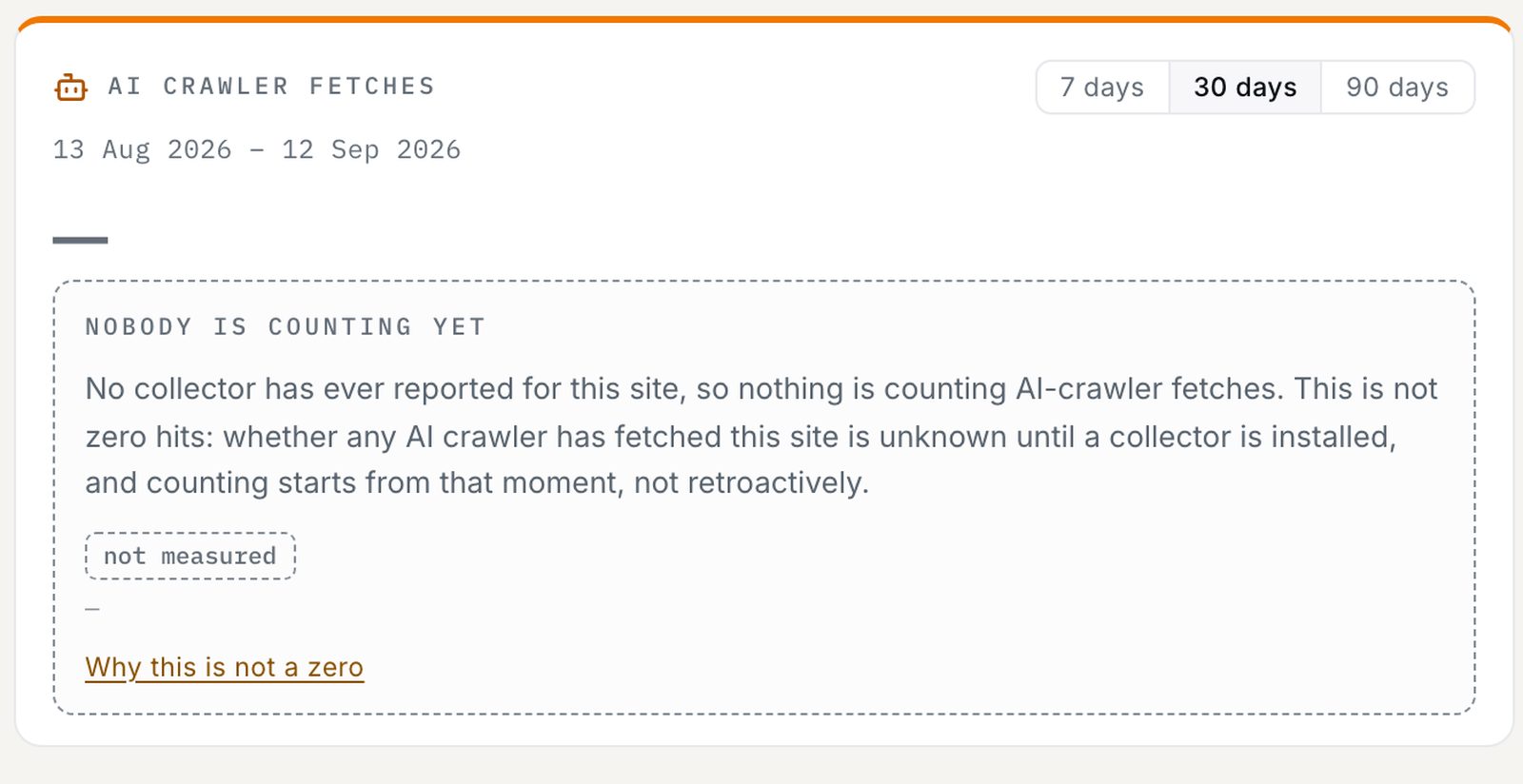
A collector on your own servers is a data-handling decision before it is a measurement, so the same screen answers that question in writing, beside the install instructions.

Fair questions
Short answers.
Does blocking GPTBot remove me from ChatGPT?
No. GPTBot collects material for training. Showing up in ChatGPT’s search results depends on
OAI-SearchBot, and somebody pasting a link into a chat depends on ChatGPT-User.
Three separate visitors, three separate decisions. Blocking the first while allowing the other two is a
perfectly coherent position: no training use, still findable.
Should I block AI from reading my site?
It depends what your content is for, and this tool does not push you either way. If your business is people reading your pages and you have no interest in being a source for answers, blocking the ones that train models is defensible. If you want to be quoted in AI answers, blocking the ones that look things up works directly against that. The only bad version is doing it by accident.
Why can’t this run in my browser?
Because a browser is not allowed to read a file from another website — that is a rule browsers enforce, not a choice we made. So the check runs on our server. We say so on the tool itself, because “runs in your browser” is only worth saying where it is true, and here it isn’t.
My site lets everyone in, so why isn’t AI quoting my pages?
Being allowed in is one requirement out of several. The page still has to show its content without needing scripts to run, be reachable from your sitemap and your other pages, and actually answer the question being asked. Access removes a blocker; it does not create a mention.
Does Google-Extended affect my Google rankings?
No. Google-Extended never visits your site and has no part in Google Search. It controls whether
content Google already collected can be used for Gemini and Vertex AI. Saying no to it is a decision
about AI use, not a search decision.
We use our own tools on this page.
Related tools
Reaching it is half the question.
robots.txt Generator
Write the corrected file — every AI visitor with its own rules, nothing inherited by accident.
runs in your browser
Render Check
They can reach it — but can they read it? What AI gets when your page’s scripts do not run.
runs on our server
AI Readiness Score
The technical checks bundled into one score you can take apart, with the weights printed.
runs on our server
Being allowed in is the start,
not the result.
An allowed row above means your robots.txt does not turn that crawler away. It does not mean an assistant has anything to say about you — permission is not a mention, and no file on your server decides that. The free check asks the assistants directly: up to five questions written from your own homepage, put to ChatGPT and Gemini, once each, with the sites named instead of you.
Ask ChatGPT and Gemini about my site
free · no card · two checks a day from one connection