Answermend / free tools
The shelf
Twenty free tools.
Every one of them runs today.
Three ask an AI what it says about your business. Eight fetch your live site from our server. Nine fetch nothing at all and work inside your own tab. Every card says which kind it is, because the three are not the same promise.
The question the rest of this site is about
Three that ask an AI,
and report what it said.
You give one of these a web address; our server puts your customers’ questions to ChatGPT and Gemini and prints what came back. Each run costs us a metered engine call, so a free check is capped: up to five questions, each asked once, the run count printed beside the answer. All three start the same scan — the second and third are that scan counted differently.
Three of the twenty · on our server · capped
AI Visibility Checker
Am I mentioned at all? One web address in, up to five buyer questions put to ChatGPT and Gemini, and a per-question answer back. Named from memory and actually quoted are kept apart, because they are two different problems with two different fixes.
asks ChatGPT and GeminiStart here. The other two on this row are views over this one’s result.
A question that could not be checked is reported unrun, never counted against you.
AI Share of Voice
Who gets recommended instead of you: every other business named across the whole run, and how many of your questions each one appeared on.
asks ChatGPT and GeminiA business the check never saw is absent from the count, not scored zero.
AI Citation Sources
Which websites AI actually quotes when it answers questions in your field. That is a list of places to go, not a promise that going there changes an answer.
asks ChatGPT and GeminiAn empty list says which kind of empty it is.
Server-side · no engine call
Eight that read
your live site.
These have to fetch something from a site we do not control, so none of them can work inside your tab. You give one a web address, our server fetches it, and the page prints what it found. Nothing here asks an engine anything, so nothing here is capped.
Eight of the twenty · on our server
AI Readiness Score
The technical checks bundled into one number you can take apart again — every weight printed on the page, so nothing is hidden inside it. It is the fullest picture this site can give you without asking an engine anything.
runs on our serverAnything it could not test leaves the denominator and is named as not measured — never counted as a zero.
AI Crawler Checker
Whether you are accidentally shutting AI out of your site — one verdict per crawler, with the line in your own rules file that decided it.
runs on our serverRender Check
Your pages as AI sees them, fetched with the scripts switched off. A site that needs them to run before it shows anything can arrive empty.
runs on our serverllms.txt Validator
Reads the file you already have and says what is wrong with it: structure, sections, links that do not resolve. A domain with no such file gets that as the finding, not an error.
runs on our serverPerplexity says it fetches one; Google said publicly in July 2025 that it does not use them, and neither OpenAI nor Anthropic has said one changes their answers. The page says so instead of selling it.
AI Content Checker
Whether a page is built so an answer can be lifted out of it: question-shaped headings, an answer directly under them, paragraphs that survive being quoted on their own.
runs on our serverIt cannot tell a good answer from well-formatted nothing, and says so on itself.
Open Graph Checker
Every og: and twitter: tag on your page as a crawler receives it, and the social card they build. General SEO, not AI visibility.
runs on our serverCanonical Tag Checker
Where your page's canonical points, whether it redirects or 404s, and where it disagrees with itself. General SEO, not AI visibility.
runs on our serverSchema Markup Validator
Paste your JSON-LD, or give a URL, and see what is missing, per type, with the source of every rule. Not a rich-results test.
paste: your tab · URL: our serverNothing you type leaves your tab
Nine that fetch nothing. Eight write
you a file; one reads one of yours.
Eight of these turn the boxes you fill in into text you can copy. The ninth reads a server log you already have. No web address is fetched, so nothing you type or paste is sent anywhere. Pressing copy or download does fire one line, to our own counter and to Google Analytics — which button, on which page, and never a character of what you typed. Both are named on our privacy page.
Nine of the twenty · in your browser
FAQ Schema Generator
Turn your common questions into a block an AI assistant can quote accurately. Paste it into your site, or hand it to whoever built it.
runs in your browser// the block this page writes today { "@context": "https://schema.org", "@type": "FAQPage", "mainEntity": [{ "@type": "Question", "name": "How long does termite treatment last?",
Google stopped showing the question-and-answer drop-downs for almost every site. This is for machines lifting a clean labelled list, and the page says which before you start.
Organization Schema Generator
Say who you are in a form a machine reads: your real name, your site, the profiles that prove it is you. Stops AI confusing you with a similarly-named business.
runs in your browserProduct Schema Generator
One product, described the way a machine reads it — name, pictures, identifiers, price. A category page listing twelve products is a list, not twelve products.
runs in your browserA box you leave empty produces no line at all. It is never filled in with a guess.
Article Schema Generator
What a page is called, who wrote it, and when. The byline is the field most people quietly invent, and this one will not do it for you.
runs in your browserrobots.txt Generator
Decide which AI companies may read your site and which may not. Every group is spelled out in full, because each company’s software obeys exactly one group and ignores the rest.
runs in your browser# robots.txt — built with answermend.com/robots-txt-generator/ User-agent: * Disallow: /admin/ # GPTBot — blocked from the whole site. Complete group: User-agent: GPTBot Disallow: /
Nothing on it makes you more visible. It is a decision about how your content may be used.
llms.txt Generator
A short summary of your site, written for AI to read.
runs in your browser# the file this page writes today
# Northwind Analytics
> Self-serve product analytics for small SaaS
> teams: funnels, retention and session replay.
No AI company has confirmed that it reads one, and the page says so rather than selling you the idea.
AI Crawler Log Analyzer
The one card here that writes nothing: paste in your server’s own access log and it reads back which AI crawlers actually arrived, when, what they asked for and what they got. A robots.txt check says who is allowed in; this says who came.
runs in your browserIt parses the log in this tab, and there deliberately is no address to upload it to, because an access log holds your visitors’ IP addresses.
It reads Apache and nginx combined format exactly, and refuses anything else out loud rather than half-reading it.
LocalBusiness Schema Generator
Address, phone, hours, price range and profiles for a restaurant, shop or service, as one JSON-LD block. No ratings, nothing invented.
runs in your browserhreflang Generator
Language and region versions of a page as link tags, an HTTP header and sitemap entries. General SEO, not AI visibility.
runs in your browserOne look past the shelf
What the paid product does
with what these tell you.
Every card above answers one question. The paid scan asks them together, again and again, and turns what came back into work: a report where every number carries its denominator, and a what-to-fix list derived from the exact questions that went wrong. Two screens of it, and no more.
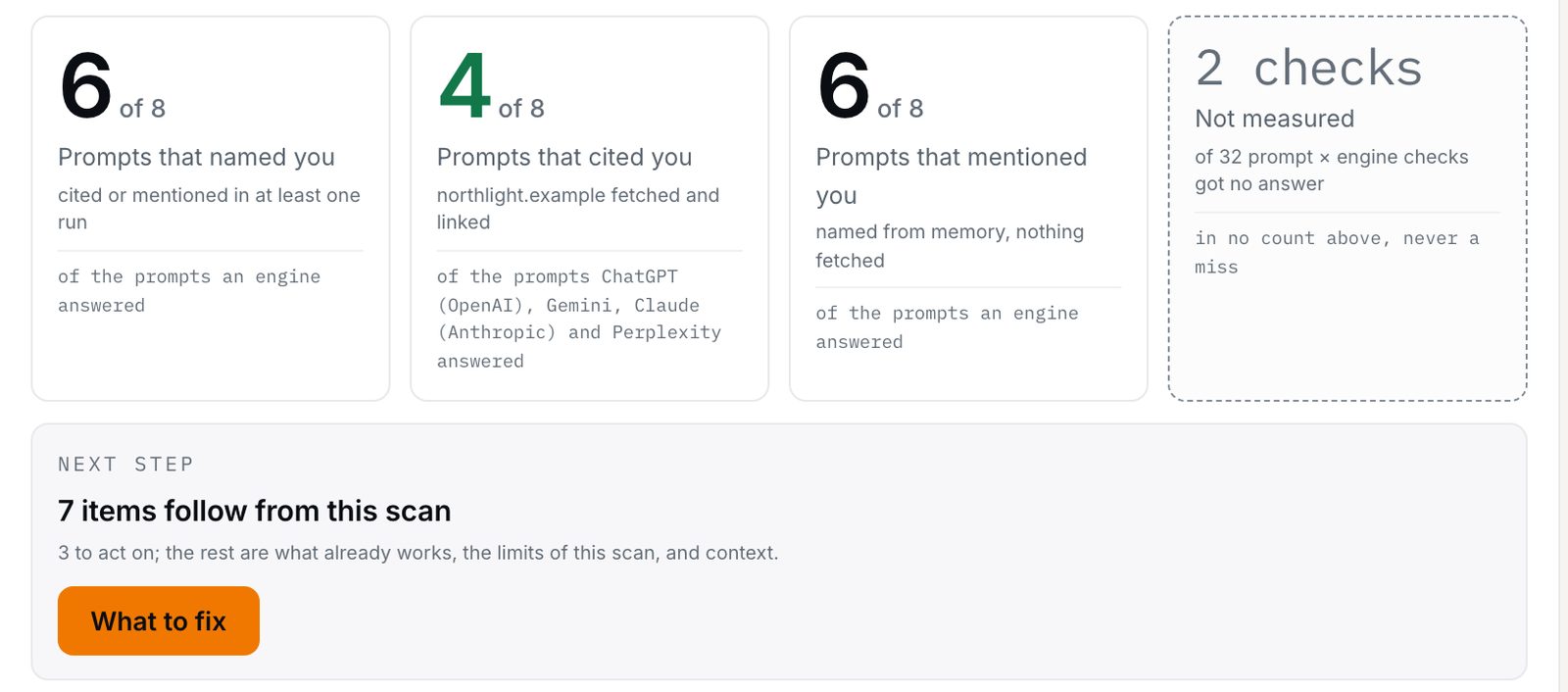
Example data. Northlight is an invented brand — no customer’s scan appears anywhere on this site. This is the shape of the scan the checker above starts, at greater depth: 8 questions across four assistants, each asked once — 32 checks, 30 came back. The 2 that did not land in the dashed tile, outside every denominator — never a zero, never a miss.
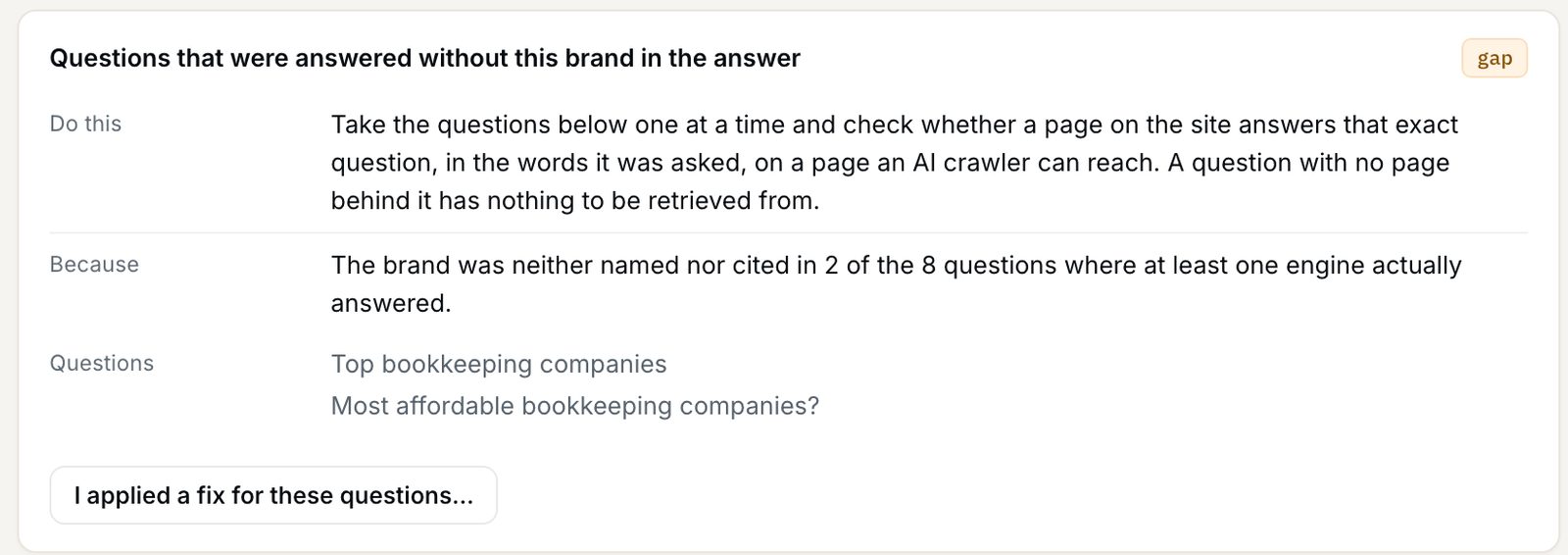
Example data — one item of seven from the same example scan. Each item states what to do, why, and names the questions it was derived from — the two at its foot are the ones this finding comes out of.
Both screens are an example Pro scan: each question asked once on each of four assistants. The free checker starts the same scan, capped — one scan, up to five questions, each asked once. On free, both assistants answer but only Gemini fetches, so cited is measured on Gemini only; on ChatGPT it is reported not measured, never counted as a zero.
Why the chips differ
A shelf that made all twenty
look the same would be lying.
Three chips, and each of them is a statement about code you can go and read.
Three chips, not one
Nine cards say runs in your browser: those tools fetch nothing, so the claim that what you type stays here is real and testable. Seven say runs on our server, because they have to fetch your site. Three say asks ChatGPT and Gemini, because they spend a real engine call on your behalf and are capped for it. One, the schema validator, says both: what you paste stays in your tab, and a URL goes to our server. One chip covering all twenty would have been false on 11 of them.
No date on any of them
You will not find "soon" or a month on these cards. A date we might miss is a promise; the chip changes when the code changes, and not a day before.
- runs in your browser No web address is fetched and nothing you type or paste is uploaded — it stays in the tab. The page's view counters still record the visit and the fact that you pressed a button. Seven cards, and only those seven.
- runs on our server You hand it a web address and our server fetches it, so the result is real and the work is not private to your tab. We never describe these five as in-browser, because they are not. No engine is asked anything, so there is nothing to cap.
- asks ChatGPT and Gemini Server-side too, and then some: these three put a real question to a real engine and we pay for the call. That is why a free run is up to five questions asked once rather than unlimited, and why the run count is printed beside the result.
- not measured A result word, not a shelf word. A check that failed, timed out or hit a cap is reported unrun with its reason and left out of every count — it is never rounded down to zero.
Also here
Three more pages, and
none of them is a tool.
A reference table, a page on checking ChatGPT, and the documentation — nothing to fill in, nothing to run.
Read first, if you like
The guides behind the tools.
Every one of these is written to be useful without buying anything, including where that costs us the sale.
Start with whichever one
names your problem.
Three of these ask an AI what it says about your business. Eight read your live site from our server and print what they found. Nine write you a file, or read one of yours, without ever leaving your tab.
Does AI mention your business? no card