Free tools / robots-txt-generator
FREE TOOL · NOTHING LEAVES THIS TAB
robots.txt Generator
Decide which AI companies are allowed to read your site, and which are not. Answer the questions on the left; the finished file appears on the right.
Choices
1 set of rules
Allow answer engines, block training crawlers. Loaded as an example, not a recommendation.
AI companies — tick the ones to block
0 blocked
robots.txt
ok ✓Save as robots.txt at the very top of your site — https://example.com/robots.txt, nowhere else.
What this file actually does
Runs entirely in your browser. Nothing you type here is sent anywhere. (checkable — open your network tab and type: nothing fires. Copy and download are counted; the text is not.)
What comes out
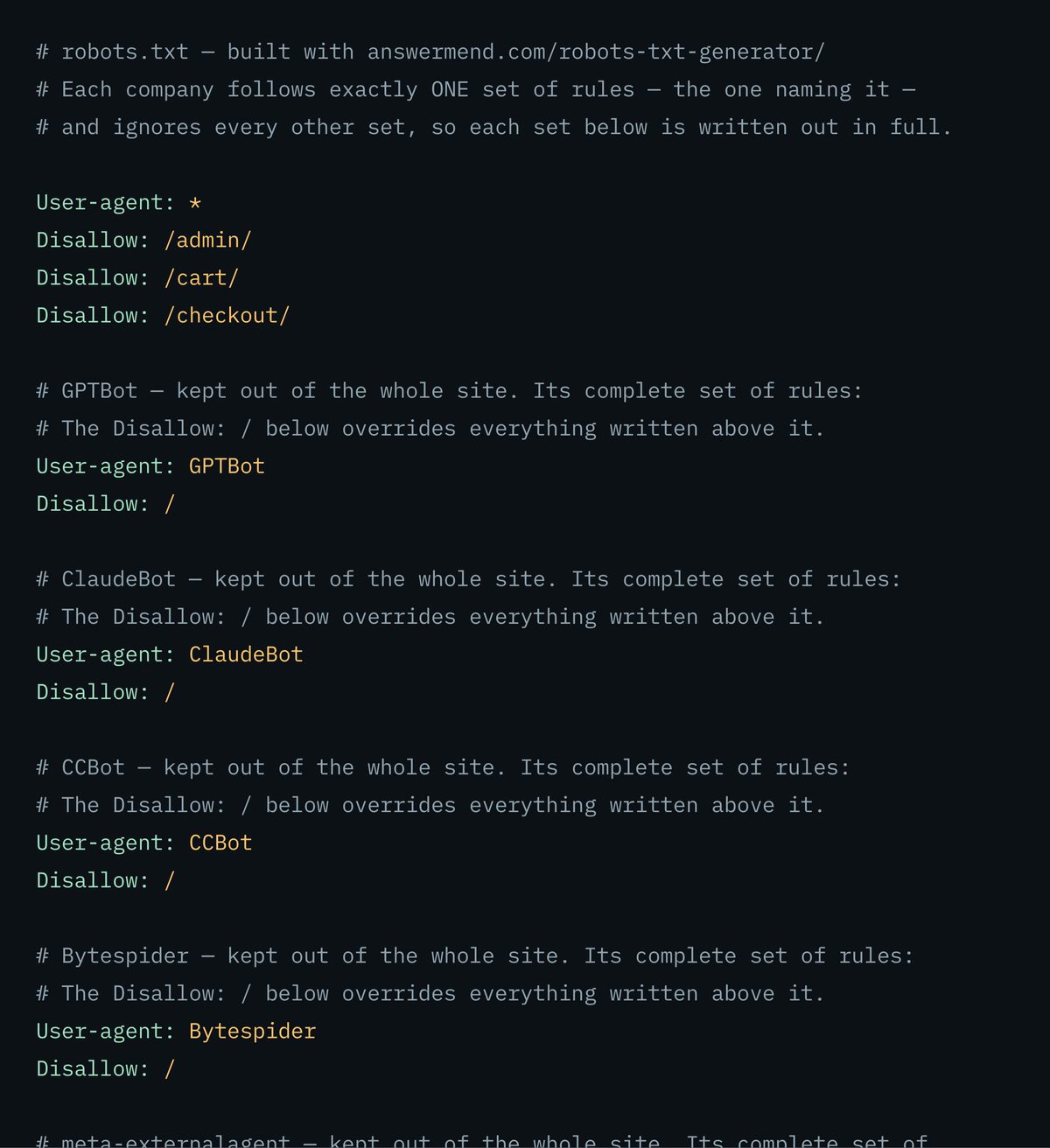
Before you answer anything, this is the file the plate above prints — the choices made for an invented site, with every blocked crawler given its complete set of rules.
WHY THIS TOOL EXISTS
The mistake that makes this file do the opposite of what you meant
The file looks simple, and it is — right up to the moment you add a second set of rules. Then this applies, and it is where most accidental blocks on the web come from:
Each company’s software follows exactly one set of rules — the one that names it by name — and ignores every other set in the file, including the rules you wrote for everyone.
The sets do not combine. Here is the same decision written both ways — on the left the file people actually write, on the right what this generator produces:
User-agent: *
Disallow: /admin/
Disallow: /cart/
Allow: /

User-agent: GPTBot
Crawl-delay: 10
GPTBot may now read /admin/ and /cart/. Its own set keeps it out of nothing, and the rules for everyone no longer apply to it.
User-agent: *
Disallow: /admin/
Disallow: /cart/

# GPTBot — allowed. Its complete set: the rules you wrote for
# everyone are repeated here, because this set replaces them for it.
User-agent: GPTBot
Disallow: /admin/
Disallow: /cart/
Crawl-delay: 10
Every rule repeated inside the named set. What you read is what that company’s software reads.
This generator writes every set out in full. Name a company and it gets every rule you set for everyone, spelled out inside its own set, plus whatever you changed for it. (And Google ignores the slow-down line anyway, so the line that started all this does nothing either.)
RFC 9309
The rules this file plays by
Written down in a published standard and followed by the major search and AI companies:
01
The more specific rule wins
Between “keep out of /blog/” and “but /blog/public/ is fine”, the longer of the two decides. On an exact tie, the one letting them in wins.
02
An empty “keep out” line means the opposite of a full one
Disallow: with nothing after it lets everything through. Disallow: / blocks your whole site. One character apart, opposite outcomes.
03
Wildcards work
* stands in for any run of characters and $ pins a rule to the end of an address. Disallow: /*.pdf$ blocks your PDFs.
04
Where it lives is fixed
The file at https://example.com/robots.txt covers https://example.com and nothing else. Not the http:// version, and not a shop or blog sitting on a different address. Each one needs its own file.
05
What your server answers matters more than people expect
If the file simply is not there, everything is allowed. If your server keeps erroring on it, Google treats that as keep out of everything — so a file that breaks during an outage can quietly pull your whole site out of being read.
06
Very long files get cut off
Google reads the first 500 KB and ignores everything after it, which only bites files that have been hand-edited into monsters.
FOUR CLASSES, FOUR DIFFERENT COSTS
This is a decision about your content, not a trick to rank higher
There is no setting on this page that makes you more visible in AI answers, and this page will not pretend there is. What you are choosing is which uses of your work you agree to:
trains AI
The ones that train AI models
GPTBot, ClaudeBot, CCBot, Bytespider and meta-externalagent take your content so it can go into training an AI model. Blocking them costs you nothing in search results or in being quoted.
answers questions
The ones that look things up to answer a question
OAI-SearchBot and PerplexityBot build the list an assistant quotes from. Blocking them takes you out of those answers.
a person asked
The ones a person sets off
ChatGPT-User, Claude-User and Perplexity-User open a page because somebody asked about it. Blocking them breaks that for your own prospects.
just a switch
Google-Extended and Applebot-Extended
These do not visit your site at all — they are switches that say no to AI use of content Google and Apple already have. Saying no changes nothing about whether you show up in Google or Apple search.
Pick deliberately. The failure this tool exists to prevent is picking by accident.
WHAT THIS FILE CANNOT DO
We’d rather tell you the limit
than sell you the file.
Blocking a page is not the same as removing it
This file stops a page being read, not listed. A blocked page can still turn up in search results — found through a link somewhere else and listed with no description, because whatever found it was never let in to read the “please do not list this” instruction you put on the page. To get a page out of search, let it be read and put that instruction on it. Blocking it here guarantees the opposite of what most people intend.
The same goes for AI. An assistant that learned about you from other people’s pages can name you whether or not it is allowed to read yours. Blocking removes your site as a source; it does not remove your business from what the model already remembers.
Limitations, stated plainly
This file is a request, not a lock on the door. Well-behaved companies honour it; anything else ignores it, and a determined scraper reads it as a map of what you consider sensitive — so never list a private address in it. This tool writes the file; it cannot put it on your site for you, and it cannot see whether your hosting or security provider is separately turning bots away before they ever reach it (that is the AI Crawler Checker’s job). And nothing you choose here causes an AI assistant to mention you or link to you.
FAQ
Fair questions.
We use our own tool on this page.
Where does this file go?
At the very top of your site: https://example.com/robots.txt. It covers that exact address only — the http and the https version, and your main site and any shop or blog on a different address, each need their own copy. A copy sitting in a subfolder is ignored completely.
Does blocking AI hurt my Google rankings?
Blocking the AI-specific ones does not affect Google Search. Google-Extended never visits your site — it is a switch about AI use of content Google already has, with no part in ranking or listing. Blocking Googlebot itself is a different and far more serious act, and this tool warns you before you copy a file that does it.
Will this stop AI from mentioning my business?
No. It stops the well-behaved ones from reading your pages. An assistant can still name you from anything it picked up elsewhere — press coverage, directories, forums, a competitor’s comparison page. Blocking removes your site as a source while leaving everyone else’s description of you in place.
Is anything I type here uploaded?
No. This tool builds the file from your answers inside your own browser tab. Not one character of what you type is sent to us, nothing is fetched from your site, and nothing you type is stored — open your browser’s network panel and type, and no request fires at all. What does leave the page is the fact that you pressed copy or download: one line to our own counter and to Google Analytics naming the button and the page, never its contents, set out in full on our privacy page. Our AI Crawler Checker is the opposite case and says so on its own page, because it has to go and read a real file from our server.
Can I just block everything and add exceptions later?
You can, and it is the most expensive reversible mistake in this file. Blocking everything for everyone shuts out every well-behaved visitor, and getting back is not instant — they have to return, re-read the file and re-read your pages before anything comes back. If you are unsure, block only the companies you have actually decided about and leave the rest allowed.
THE FILE IS FIVE MINUTES
A file in your downloads folder
is not a file on your site.
Upload it, then have it read back off your live domain: one verdict per AI crawler, with the exact rule line and the group that produced it. A file that never went up, a path that is wrong, or a host answering crawlers differently from browsers — all three look identical from here and only one of them shows up there.